
TL;DR: Effective Shopify promotion management has three phases: plan your discount strategy with a clear goal before launch, deploy every element of the promotional campaign reliably so nothing is missed, and measure promo ROI against a baseline so each campaign makes the next one better. The merchants who do all three consistently outperform the ones who treat each promo as a one-off.
Running a Shopify promotion is easy. Running one that actually works, and knowing whether it worked, is harder than most merchants expect.
The merchants who consistently outperform their baseline do not just pick a discount and turn it on. They treat Shopify promotion management as a system with three distinct phases: planning the strategy upfront, executing it without manual errors, and analysing the results in a way that makes the next promo better. Each phase builds on the previous one.
This article covers each phase in order, with the strategic principles behind it and the practical ways to implement them.
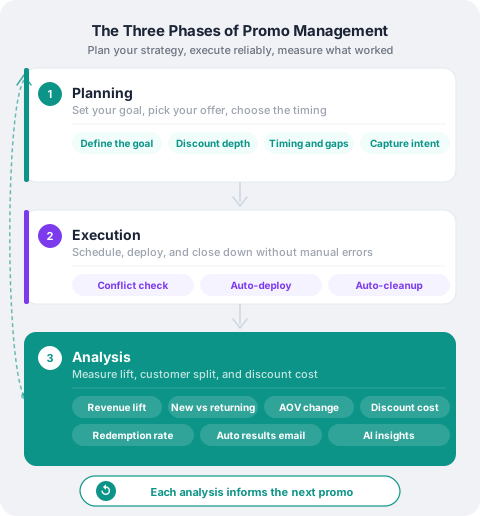
The three phases of Shopify promotion management
Phase 1: Planning your Shopify promotion
A Shopify promotion plan is the set of decisions you make before a promotional campaign goes live: the goal, the discount depth, the timing, and the success metric. Making these decisions in advance, rather than mid-launch, is what separates merchants who can measure campaign results from those who are guessing after the fact.
Most promo planning starts with the discount ("let's do 20% off") and works backwards from there. That approach skips the decisions that actually determine whether the campaign is worth running.
Start with the goal. A promotional campaign can serve different purposes, and the setup should reflect which one you are chasing:
- Revenue lift: you want more Shopify sales than you would have had without the promo. This is measured against a baseline and is the clearest signal of incremental impact.
- New customer acquisition: you are willing to accept lower margin on first orders in exchange for bringing buyers into your store who may return at full price.
- Inventory clearance: you are moving specific SKUs, and the success metric is units sold, not margin.
- Retention and loyalty: you are rewarding existing customers with a discount code to improve repeat purchase rates.
Each goal implies a different discount depth, a different product selection, and a different definition of success. Without making this decision explicitly, you cannot evaluate campaign results after the fact.
Choose your discount depth carefully. The relationship between discount depth and behaviour is not linear:
| Goal | Discount depth | Primary success metric |
|---|---|---|
| Revenue lift | 10–20% | Lift % vs baseline |
| New customer acquisition | 20–30% | New buyer share |
| Inventory clearance | 25–40% | Units sold |
| Retention and loyalty | 10–15% | Repeat purchase rate |
Above 30%, you risk training customers to wait for sales and compressing margin without proportional volume gains. Use deep discounts selectively for clearance, not as a default.
Plan the timing deliberately. Promotions run too close together contaminate each other's baselines. If you end one promo on a Monday and start another on Tuesday, the second promo has no clean comparison window. A gap of at least the promo duration itself gives you a usable baseline.
Timing also affects who responds. A promo running during a peak period (the week before a holiday) is competing against organic demand that would have happened anyway. A promo during a slow period has more room to show true incremental lift.
Capture your intent before launch. Before a promo goes live, write down: the goal, the expected lift, the target customer segment, and the hypothesis you are testing. This does not need to be elaborate. A single note is enough. Without it, post-promo review becomes guesswork. You will read whatever you expected into the data.
PromoOS stores all of this in the promo record at creation time: type, discount depth, target products, banner content, and an optional revenue goal. When you open the promo analytics page after the campaign ends, the intent is right there alongside the results, so you can compare what you planned against what actually happened.
Phase 2: Deploying your Shopify promotion reliably
Even a well-planned promo can fail at execution. The most common failure modes are not strategic: they are operational.
The manual deployment problem. Running a promo on Shopify without tooling requires coordinating several separate systems at the same moment:
- Activate the discount code in Shopify admin
- Update banners in the theme editor
- Apply compare-at prices to the relevant variants
- Set a reminder to undo all of it at the end
Miss any step and you have a partial deployment. Forget to remove the banner after the promo ends and customers see an offer that no longer exists. Forget to deactivate the discount and you are giving away margin with no campaign running. These common promo mistakes happen to merchants at every level of sophistication, because manual coordination at a specific time is inherently unreliable.
Scheduling is not the same as activation. Many merchants treat scheduling as just picking a date. But the date decision has downstream consequences: it determines the baseline window, affects who is in market when the promo runs, and may overlap with other campaigns already on the calendar. Reviewing your full promotional calendar before setting a date catches these conflicts before they happen.
Storefront consistency matters. A discount code that works but a banner that does not show, or a banner that shows but the code has expired, creates a frustrating experience. These two things need to be treated as a single unit, deployed and withdrawn together.
PromoOS deploys discount codes, storefront banners and theme content, and compare-at prices together at the scheduled start time, and reverses everything when the promo ends. If you are scheduling a flash sale, this means you can set it up days in advance and trust it will go live correctly at the right moment, without staying at your desk.
Phase 3: Measuring Shopify promotion results
This is the phase most merchants skip, or do badly. The reason is usually a lack of structure: there is no standard report to run, no baseline to compare against, and no trigger that says "it is time to review."
Revenue alone is not enough. A promo that generated $15,000 in Shopify sales is not obviously good or bad without context. You need to know what your store would have generated in that same period without the promo running.
That comparison is your baseline. A baseline is your store's typical revenue for an equivalent time window immediately before the promotional campaign started, adjusted to exclude any other promo activity. For a 7-day campaign, the baseline is the 7 days before it launched. Lift is then the percentage difference between baseline revenue and promo period revenue. For example: if your baseline was $10,600 and your promo generated $14,200, promo ROI expressed as lift is 34%. That is the clearest signal you have that the campaign drove incremental demand rather than just pulling forward Shopify sales that would have happened anyway.
What to measure beyond top-line revenue:
- Lift against baseline: did the promo drive incremental sales, or did it just pull forward demand that would have happened anyway?
- New vs returning customers: acquisition promos should show a higher-than-usual share of new buyers. A promo aimed at acquisition that mostly converts returning customers has the wrong setup.
- Average order value (AOV): discounts often reduce AOV because customers buy fewer items to hit a lower price point. A drop in AOV is not automatically bad, but a large drop with flat order volume means you gave away margin for no incremental revenue.
- Discount rate: total discount cost as a share of net sales. A 20% discount code does not translate to a 20% discount rate if not every order uses it. High redemption with a high discount rate means your margin is under pressure.
- Redemption rate: what share of orders during the promo window actually used the code? A low redemption rate means the offer was not visible enough. A very high redemption rate may mean you are mostly converting customers who would have bought anyway.
Close the loop. The most important habit in promo management is reviewing results before the context fades. A structured debrief done the day after the promo ends, while the decisions are still fresh, produces action items that actually influence the next campaign. A review done two weeks later rarely does.
PromoOS sends a results email within minutes of the promo ending, with the three main KPIs and a key insight drawn from your metrics. The full dashboard shows lift, customer split, top products, discount cost, and automatically flagged insights that surface specific patterns, such as whether most orders came from new buyers or returning ones, whether AOV dropped, or whether the code had low visibility. For a deeper look at what these metrics tell you and how to read them, see the complete guide to Shopify promotions.
Why systematic Shopify promo management compounds over time
Each promo teaches you something if you are paying attention. A finding from one campaign (that your discount code was barely visible, or that most buyers were returning customers, or that lift was strongest in the first two days) changes how you set up the next one. This is what a compounding Shopify discount strategy looks like in practice: not a single clever campaign, but a system that gets sharper over time.
Merchants who apply this consistently do not necessarily run more promos. They run better ones, because each promotional campaign is informed by the one before it. The gap between a merchant who has run 20 promos thoughtfully and one who has run 20 promos reactively is significant, and it compounds over time.
The infrastructure for this does not need to be complex. A clear goal before launch, a reliable deployment, and a structured review of promo analytics within 24 hours of completion are enough to build the feedback loop. The tools should make each of those steps easy, not add friction to them.
PromoOS is free to install. Get started on the Shopify App Store or open the dashboard.